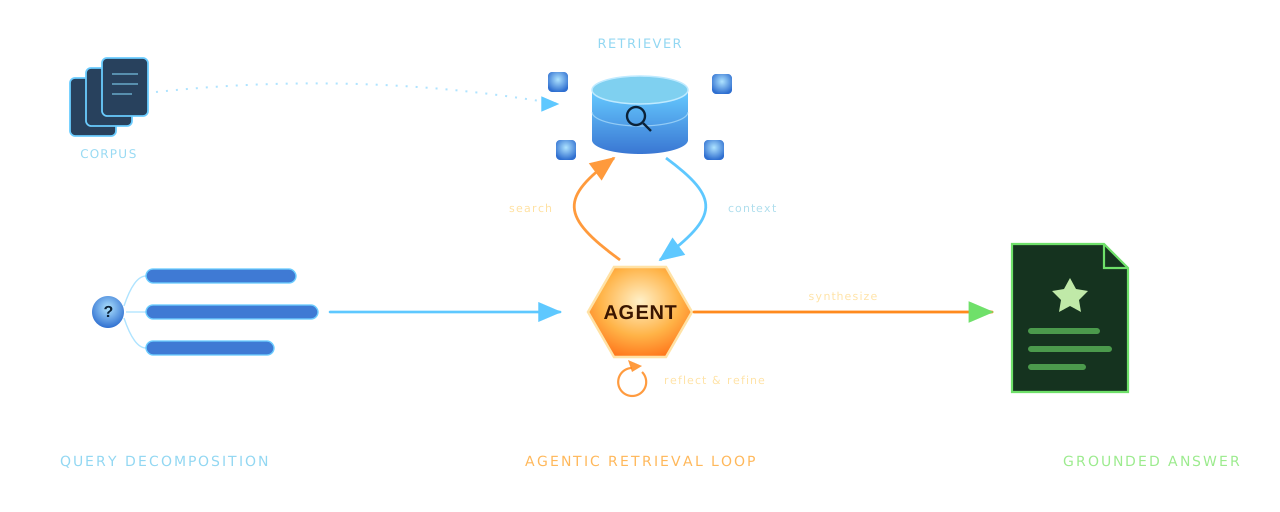
Traditional Retrieval-Augmented Generation (RAG) systems follow a straightforward pattern: embed a query, find similar chunks, and pass them to a language model. This approach works well for simple questions, but it breaks down when users ask complex, multi-part questions needed for a comprehensive answer. We will explore giving agency to RAG systems — the ability to reason about queries, decide what information they need, and iteratively refine their search strategy.
In this post, we’ll build a Agentic RAG system that will analyze queries, break down complex questions, search then reason over result, and know when need more context. By the end, you’ll have a complete implementation that you can adapt to your own document collections.
The Limitations of Traditional RAG
Consider a user asking a complex query: “How does the authentication system work, and what are the security implications of the current implementation?” A naive RAG system would embed this entire question, retrieve chunks that match the combined semantic meaning, and hope for the best. The retrieved chunks might touch on authentication without addressing security, or vice versa. The system has no mechanism to recognize that this is actually two related questions requiring different retrieval strategies.
Another common failure mode occurs with follow-up questions. When a user asks “How do I update it?” after discussing a specific feature, traditional RAG systems treat this as an independent query. Without conversational context, the system has no idea what “it” refers to, leading to irrelevant or generic responses.
Agentic RAG addresses these limitations by introducing a reasoning layer between the user and the retrieval system. The agent analyzes queries, maintains conversational context, and makes decisions about when and how to search.
Architecture Overview
Our Agentic RAG system have a four-stage workflow:
- Analyzes conversation history to maintain context across multiple interactions.
- Examines the user’s query, determines if it’s clear enough to answer, and rewrites it for optimal retrieval.
- Performs retrieval using a hierarchical indexing strategy.
- Generates and aggregates responses.
We uses the parent-child chunking strategy for document indexing: Large documents are first split into substantial parent chunks based on logical boundaries like headers. These parent chunks are then subdivided into smaller child chunks optimized for semantic search. When the agent searches, it queries the child chunks for precision but can retrieve the full parent chunk when more context is needed.
This hierarchical approach minimize a fundamental RAG system design issue. Small chunks improve retrieval precision because they’re more likely to match specific queries semantically. However, small chunks often lack the context needed to generate comprehensive answers. By maintaining the relationship between child and parent chunks, we get context from both.
Setting Up
The implementation uses pydantic-ai for building type-safe AI agents, pydantic-graph for orchestrating the workflow as a state machine, and LanceDB as a high-performance vector database. Let’s start by defining the core data structures that flow through our system.
from dataclasses import dataclass, field
from typing import Optional
from pydantic import BaseModel, Field
from pydantic_ai import ModelMessage


class QueryAnalysis(BaseModel):
    """Structured output for query analysis."""
    is_clear: bool = Field(
        description="Indicates if the user's question is clear and answerable"
    )
    questions: list[str] = Field(
        description="List of rewritten, self-contained questions"
    )
    clarification_needed: str = Field(
        default="",
        description="Explanation if the question is unclear"
    )


class ChunkResult(BaseModel):
    """Result from searching child chunks."""
    content: str
    parent_id: str
    source: str


@dataclass
class RAGState:
    """State for the RAG workflow graph."""
    original_query: str = ""
    processed_queries: list[str] = field(default_factory=list)
    query_is_clear: bool = True
    clarification_message: str = ""
    conversation_summary: str = ""
    child_chunks: list[ChunkResult] = field(default_factory=list)
    response: Optional[RAGResponse] = None
    message_history: list[ModelMessage] = field(default_factory=list)
The RAGState dataclass serves as the shared memory for our workflow graph. As the query flows through different processing stages, each node reads from and writes to this state object. The QueryAnalysis model defines the structured output we expect from the query analysis agent, ensuring that the LLM returns data in a predictable format.
LanceDB Vector Store
LanceDB provides a compelling alternative to traditional vector databases like Qdrant or Pinecone. It’s embedded, meaning it runs in-process without requiring a separate server, yet it scales to billions of vectors and supports advanced features like hybrid search. The integration with Pydantic makes schema definition elegant and type-safe.
import lancedb
from lancedb.pydantic import LanceModel, Vector
from lancedb.embeddings import get_registry

# Initialize embedding function
embedding_func = get_registry().get("sentence-transformers").create(
    name="sentence-transformers/all-MiniLM-L6-v2",
    device="cpu"
)


class ChildChunkSchema(LanceModel):
    """Schema for child chunks stored in LanceDB."""
    text: str = embedding_func.SourceField()
    vector: Vector(embedding_func.ndims()) = embedding_func.VectorField()
    parent_id: str
    source: str


class VectorStore:
    """LanceDB-based vector store for document chunks."""

    def __init__(self):
        self.db = lancedb.connect("./lancedb_data")
        self._table = None

    def search(self, query: str, k: int = 5) -> list[ChunkResult]:
        """Search for similar chunks."""
        if not self.table:
            return []

        results = self.table.search(query).limit(k).to_pandas()

        return [
            ChunkResult(
                content=row["text"],
                parent_id=row["parent_id"],
                source=row["source"]
            )
            for _, row in results.iterrows()
        ]
The ChildChunkSchema class demonstrates LanceDB’s embedding function integration. By marking text as a SourceField and vector as a VectorField, we tell LanceDB to automatically generate embeddings when data is inserted and when queries are executed. This abstraction eliminates the need to manually manage embedding generation, reducing boilerplate.
Hierarchical Document Processing
The document processing pipeline converts raw documents into a searchable index. We first split documents by markdown headers to create semantically meaningful parent chunks, then subdivide these into smaller child chunks for precise retrieval.
class MarkdownHeaderSplitter:
    """Split markdown documents by headers."""

    def __init__(self, headers_to_split_on: list[tuple[str, str]]):
        self.headers_to_split_on = headers_to_split_on

    def split_text(self, text: str) -> list[Document]:
        """Split text by markdown headers."""
        lines = text.split("\n")
        chunks = []
        current_chunk = []
        current_metadata = {}

        for line in lines:
            header_match = None
            for header_marker, header_name in self.headers_to_split_on:
                pattern = f"^{re.escape(header_marker)}\\s+"
                if re.match(pattern, line):
                    header_match = (header_marker, header_name, line)
                    break

            if header_match:
                if current_chunk:
                    content = "\n".join(current_chunk).strip()
                    if content:
                        chunks.append(Document(
                            page_content=content,
                            metadata=dict(current_metadata)
                        ))

                marker, name, header_line = header_match
                header_text = header_line[len(marker):].strip()
                current_metadata[name] = header_text
                current_chunk = [header_line]
            else:
                current_chunk.append(line)

        if current_chunk:
            content = "\n".join(current_chunk).strip()
            if content:
                chunks.append(Document(
                    page_content=content,
                    metadata=dict(current_metadata)
                ))

        return chunks
The splitter maintains metadata about the header hierarchy as it processes the document. When we later retrieve a chunk, we know not just its content but also which section and subsection it belongs to. This metadata proves invaluable for providing context to LLM.
After creating parent chunks, we apply size constraints to ensure consistency. Chunks that are too small get merged with their neighbors, while chunks that exceed the maximum size get split further. This normalization ensures that our retrieval operates on reasonably sized units of information.
def merge_small_parents(chunks: list[Document], min_size: int) -> list[Document]:
    """Merge small parent chunks together."""
    if not chunks:
        return []

    merged = []
    current = None

    for chunk in chunks:
        if current is None:
            current = Document(
                page_content=chunk.page_content,
                metadata=dict(chunk.metadata)
            )
        else:
            current.page_content += "\n\n" + chunk.page_content
            for k, v in chunk.metadata.items():
                if k in current.metadata:
                    current.metadata[k] = f"{current.metadata[k]} -> {v}"
                else:
                    current.metadata[k] = v

        if len(current.page_content) >= min_size:
            merged.append(current)
            current = None

    if current:
        if merged:
            merged[-1].page_content += "\n\n" + current.page_content
        else:
            merged.append(current)

    return merged
Agent with Tool-Based Retrieval
The heart of our system is the RAG agent, built using pydantic-ai’s agent framework. This agent has access to tools that it can invoke to gather information. The agent decides when to search, evaluates whether the results are sufficient, and can request additional context when needed.
from pydantic_ai import Agent, RunContext

rag_agent = Agent(
    "ollama:qwen3:4b-instruct-2507-q4_K_M",
    deps_type=ConversationContext,
    output_type=str,
    system_prompt="""You are a retrieval-augmented assistant.

Before producing ANY final answer, you must first perform a document search
and observe retrieved content.

Workflow:
1. Search the documents using the user query.
2. Inspect retrieved excerpts and keep only relevant ones.
3. Retrieve additional surrounding context ONLY if excerpts are insufficient.
4. Answer using ONLY retrieved information.
5. List source files at the end.

If no relevant information is found, rewrite the query and search again once.
If still no results, acknowledge the limitation.""",
)


@rag_agent.tool
async def search_child_chunks(
    ctx: RunContext[ConversationContext],
    query: str,
    k: int = 5
) -> list[dict]:
    """Search for the top K most relevant child chunks.

    Args:
        query: Search query string
        k: Number of results to return
    """
    results = vector_store.search(query, k=k)
    return [
        {
            "content": r.content,
            "parent_id": r.parent_id,
            "source": r.source
        }
        for r in results
    ]


@rag_agent.tool
async def retrieve_parent_chunks(
    ctx: RunContext[ConversationContext],
    parent_ids: list[str]
) -> list[dict]:
    """Retrieve full parent chunks by their IDs for more context.

    Args:
        parent_ids: List of parent chunk IDs to retrieve
    """
    results = parent_store.get_multiple(parent_ids)
    return [
        {
            "content": r.content,
            "parent_id": r.parent_id,
            "metadata": r.metadata
        }
        for r in results
    ]
The @rag_agent.tool decorator registers functions as tools the agent can call. Pydantic-ai automatically extracts the function signature and docstring to create tool descriptions that the LLM uses to decide when and how to invoke each tool. The type hints ensure that arguments are validated before the function executes.
- The agent’s system prompt establishes a mandatory workflow where searching must precede answering, trying to prevent model from hallucinating responses without grounding them in retrieved documents.
The two-tier tool design reflects our hierarchical indexing strategy. The agent first searches child chunks for precision, then can expand to parent chunks when the retrieved snippets lack sufficient context. This mirrors how a human researcher might work: start with a targeted search, then read the surrounding material when a snippet looks promising but incomplete.
Orchestrating the Workflow
While the RAG agent handles the core retrieval and generation logic, we need a higher-level orchestration layer to manage the complete query lifecycle. Pydantic-graph provides a type-safe state machine where nodes are dataclasses and edges are defined by return type annotations.
from dataclasses import dataclass
from typing import Union
from pydantic_graph import BaseNode, End, Graph, GraphRunContext


@dataclass
class SummarizeConversation(BaseNode[RAGState]):
    """Analyze conversation history and create a summary for context."""

    async def run(self, ctx: GraphRunContext[RAGState]) -> AnalyzeQuery:
        if ctx.state.message_history:
            summary = await summarize_conversation(ctx.state.message_history)
            ctx.state.conversation_summary = summary
        return AnalyzeQuery()


@dataclass
class AnalyzeQuery(BaseNode[RAGState]):
    """Analyze and rewrite the user query for better retrieval."""

    async def run(
        self,
        ctx: GraphRunContext[RAGState]
    ) -> Union[RunRAGAgent, RequestClarification]:
        analysis = await analyze_query(
            ctx.state.original_query,
            ctx.state.conversation_summary
        )

        if analysis.is_clear:
            ctx.state.query_is_clear = True
            ctx.state.processed_queries = analysis.questions
            return RunRAGAgent()
        else:
            ctx.state.query_is_clear = False
            ctx.state.clarification_message = analysis.clarification_needed
            return RequestClarification()
Each node in the graph is a dataclass that inherits from BaseNode, parameterized with the state type. The run method contains the node’s logic and returns the next node to execute. Pydantic-graph reads the return type annotation to determine valid edges, enabling static analysis and visualization of the workflow.
The AnalyzeQuery node demonstrates conditional routing. After analyzing the query, it returns either RunRAGAgent if the query is clear or RequestClarification if the user’s intent is ambiguous. This human-in-the-loop pattern prevents the system from generating unhelpful responses to poorly formed questions.
@dataclass
class RunRAGAgent(BaseNode[RAGState, None, RAGResponse]):
    """Run the RAG agent to retrieve and generate a response."""

    async def run(
        self,
        ctx: GraphRunContext[RAGState]
    ) -> AggregateResponses | End[RAGResponse]:
        conversation_context = ConversationContext(
            conversation_summary=ctx.state.conversation_summary
        )

        answers = []
        for i, query in enumerate(ctx.state.processed_queries):
            response_text, new_messages = await generate_rag_response(
                query,
                conversation_context=conversation_context,
                message_history=ctx.state.rag_agent_messages
            )
            ctx.state.rag_agent_messages.extend(new_messages)
            answers.append({"index": i, "query": query, "answer": response_text})

        if len(answers) == 1:
            response = RAGResponse(answer=answers[0]["answer"], sources=[])
            ctx.state.response = response
            return End(response)

        return AggregateResponses(answers=answers)


# Create the workflow graph
rag_workflow = Graph(
    nodes=[
        SummarizeConversation,
        AnalyzeQuery,
        RequestClarification,
        RunRAGAgent,
        AggregateResponses,
    ]
)
The RunRAGAgent node processes each query generated by the analysis stage. For single queries, it returns directly with End[RAGResponse]. For multi-part queries, it routes to AggregateResponses for combination. This design handles both simple questions and complex multi-faceted queries through the same workflow.
Query Analysis and Rewriting
The query analysis stage serves as a preprocessing step that improves retrieval quality. Raw user queries often contain pronouns referencing earlier conversation, conversational filler, or multiple interleaved questions. The analysis agent transforms these into clean, self-contained queries optimized for vector search.
QUERY_ANALYSIS_PROMPT = """Rewrite the user query so it can be used for document retrieval.

User query: "{query}"

{context_section}

Rules:
- The final query must be clear and self-contained.
- If the query contains a specific product name, brand, or technical term,
  treat it as domain-specific and IGNORE the conversation context.
- Use the conversation context ONLY if needed to understand the query.
- Fix grammar, typos, and unclear abbreviations.
- Remove filler words and conversational wording.

Splitting:
- If the query contains multiple unrelated information needs,
  split it into at most 3 separate search queries.
- Do NOT split unless it improves retrieval.

Failure:
- If the intent is unclear or meaningless, mark as unclear."""


query_analysis_agent = Agent(
    get_model_string(),
    output_type=QueryAnalysis,
    system_prompt="You are a query analysis assistant...",
)


async def analyze_query(query: str, conversation_summary: str = "") -> QueryAnalysis:
    context_section = (
        f"Conversation context (use only if needed):\n{conversation_summary}"
        if conversation_summary.strip()
        else "Conversation context: none"
    )

    prompt = QUERY_ANALYSIS_PROMPT.format(
        query=query,
        context_section=context_section
    )

    result = await query_analysis_agent.run(prompt)
    return result.output
The analysis prompt balances several concerns. It instructs the LLM to use conversation context for pronoun resolution but to avoid letting context override explicit query terms. This prevents the common failure mode where a follow-up question about a new topic gets incorrectly rewritten based on the previous discussion.
Query splitting handles multi-part questions by generating separate search queries for each information need, then aggregating the results into a coherent response.
The structured output type QueryAnalysis ensures the agent returns exactly what we need: a clarity flag, a list of rewritten queries, and optionally an explanation of why clarification is needed.
User Interface
With the backend complete, we need an interface to interact with the system. Streamlit provides a rapid development path for data applications, with built-in support for chat interfaces and file uploads.
import streamlit as st
import asyncio

def render_chat():
    """Render the chat interface."""
    st.header("💬 Chat with your Documents")

    for message in st.session_state.messages:
        with st.chat_message(message["role"]):
            st.markdown(message["content"])

    if prompt := st.chat_input("Ask a question about your documents..."):
        st.session_state.messages.append({"role": "user", "content": prompt})

        with st.chat_message("user"):
            st.markdown(prompt)

        with st.chat_message("assistant"):
            with st.spinner("Thinking..."):
                loop = asyncio.new_event_loop()
                asyncio.set_event_loop(loop)
                try:
                    response = loop.run_until_complete(process_query(prompt))
                finally:
                    loop.close()

                st.markdown(response)

        st.session_state.messages.append({"role": "assistant", "content": response})


async def process_query(query: str) -> str:
    """Process a user query through the RAG workflow."""
    response, state = await run_rag_workflow(
        query,
        message_history=st.session_state.message_history
    )

    if state.rag_agent_messages:
        st.session_state.message_history.extend(state.rag_agent_messages)

    if len(st.session_state.message_history) > 20:
        st.session_state.message_history = st.session_state.message_history[-20:]

    return response.answer
The interface maintains conversation history in Streamlit’s session state, passing it to each workflow invocation for context. We limit the history to the most recent twenty messages to prevent context windows from growing unbounded while still maintaining conversational coherence.
Running
To use the system, first upload documents through the sidebar interface. PDFs are automatically converted to markdown using pymupdf4llm, which preserves document structure better than raw text extraction. The markdown files are then processed through the hierarchical chunking pipeline and indexed in LanceDB.
def render_sidebar():
    with st.sidebar:
        st.title("🤖 Agentic RAG")

        uploaded_files = st.file_uploader(
            "Upload PDF or Markdown files",
            type=["pdf", "md"],
            accept_multiple_files=True
        )

        if st.button("📥 Add Documents"):
            if uploaded_files:
                with st.spinner("Processing documents..."):
                    for file in uploaded_files:
                        if file.name.endswith(".pdf"):
                            save_path = DOCS_DIR / file.name
                        else:
                            save_path = MARKDOWN_DIR / file.name

                        with open(save_path, "wb") as f:
                            f.write(file.read())

                        if file.name.endswith(".pdf"):
                            add_document(str(save_path))

                    st.success(f"✅ Added {len(uploaded_files)} document(s)")

        if st.button("🔄 Index All"):
            with st.spinner("Indexing documents..."):
                process_pdfs()
                child_count, parent_count = index_documents(recreate=True)
                st.success(f"✅ Indexed {child_count} chunks")
Once documents are indexed, you can ask questions in the chat interface. The system processes each query through the full workflow: summarizing conversation context, analyzing and potentially rewriting the query, performing agentic retrieval, and generating a grounded response.
Conclusion
Agentic RAG represents a natural evolution from traditional retrieval-augmented generation. By giving the system agency to reason about queries, decide what information it needs, and iteratively refine its search strategy, geting more robust and comprehensive responses to complex questions.
The complete source code is available for you to explore, modify, and adapt to your own use cases.