I have many years of Machine Learning experience, building ML pipelines on SageMaker, Vertex AI, and Databricks. Time ago I decided to apply the same MLOps principles to fun experiments at home: just needed to set up a Kubernetes cluster with some Helm charts would be enough. It worked. Barely. I was spending more time fighting infrastructure than actually using the local services.
Then I found dstack. The setup was absurdly simple, just a few YAML files and I had GPU-native scheduling, task orchestration, and serving endpoints all in one. Just a clean, declarative way to define my ML infrastructure that scale when needed.
In this post we will build an MLOPs system to fine-tune a Small Language Model to be better at function calling, we will use llama-3-8b-Instruct model and do Supervised Fine-Tuning (SFT) on Salesforce/xlam-function-calling-60k dataset. At end we will have home AI lab that works the way a production system should: version-controlled, automated, reproducible, and scalable.
I built this on a single RTX 3090, but the architecture works anywhere just swap in cloud GPUs (A100s, L4s) by updating the fleet config. Also the same workflows scale to cloud or your existing cluster without rewrite.
The system should be simple, just GitHub and HuggingFace accounts and a GPU compute… let’s build together.
The Architecture
The architecture centers on a single principle: infrastructure as code. Every component (GPU fleet, training jobs configuration, serving endpoints) is defined declaratively in version-controlled files. This is standard practice in production DevOps/MLOps.
Here’s what it ends up:

dstack is the control plane I chose after evaluating some others open-source options. It orchestrates development environments, training tasks, and serving endpoints across any compute backend (cloud VMs, Kubernetes clusters, SSH-accessible machines) like my home server, or multi-GPU distributed setups. What sold me was how it treats GPU workloads as first-class citizens: native support for multi-GPU jobs, spot instance policies, and auto-scaling inference endpoints… Same YAML, different compute target.
Unsloth provides optimized LoRA training that dramatically reduces memory requirements and training time. Combined with TRL (Transformer Reinforcement Learning), I get a production quality training stack that can fine-tune open-source models on a single consumer GPU.
trackio handles experiment tracking through a simple integration that logs metrics to a HuggingFace Space. To get real-time visibility into training runs without running any additional infrastructure.
HuggingFace Hub model registry, the source of truth for trained models that I can pull for inference anywhere.
GitHub Actions handles CI/CD, enabling training runs triggered by code changes or manual dispatch.
The Principles Behind the System
Before diving into code, let’s talk about the foundation. MLOps is about optimizing resources, basically define a set of practices that distinguish well design systems from chaos. Understanding “why” before “how” will help you adapt this system to your needs.
Version Everything
What I’ve learned: training scripts changes, hyperparameters get mixed in notebooks state, and data changes without any knowing it. At any point, you should be able to answer: “Which data and code produced this model?” This seems obvious, yet most ML projects fail here.
So just version everything through Git. Training configurations, workflows, and evaluation scripts all live in the repository. Combined with dataset versioning (via DVC, dataset hashes, or Git LFS…) and model versioning (via Model Hub), we achieve complete reproducibility.
Standardized, Automated Pipelines
The path from raw data to deployed model should be automated and repeatable. Manual steps introduce variability and create bottlenecks. This extends beyond simple automation to continuous training (CT), the practice of automatically retraining models when new data arrives or performance degrades.
Reproducible, Containerized Environments
Every training run, evaluation job, and inference endpoint must execute in a deterministic environment. Docker containers provide this guarantee, while infrastructure-as-code ensures the compute environment itself is reproducible.
Comprehensive Monitoring and Observability
Production ML systems require visibility into three domains:
- Data quality: Schema violations, distribution drift, missing values
- Model performance: Accuracy metrics, latency, fairness measures
- System health: GPU utilization, memory pressure, error rates
The system integrates trackio for training metrics, structured evaluation outputs, and dstack’s built-in monitoring for system-level observability.
Platform-First Mindset
Instead of a collection of scripts, MLOps favors a unified control plane that orchestrates the entire lifecycle. Development, training, and serving all flow through a single interface with consistent configuration patterns.
These principles guided every choice I made. Now let’s build the actual system that embodies them.
Setting Up the Infrastructure
Setting up the infrastructure is straightforward. I’ll assume you have a Linux machine with an NVIDIA GPU ready.
Start by making sure your GPU server has the necessary drivers and Docker runtime:
# Install NVIDIA drivers (if not present)
sudo apt update
sudo apt install -y nvidia-driver-535

# Install Docker
curl -fsSL https://get.docker.com | sh
sudo usermod -aG docker $USER

# Install NVIDIA Container Toolkit
distribution=$(. /etc/os-release;echo $ID$VERSION_ID)
curl -s -L https://nvidia.github.io/nvidia-docker/gpgkey | sudo apt-key add -
curl -s -L https://nvidia.github.io/nvidia-docker/$distribution/nvidia-docker.list | \
  sudo tee /etc/apt/sources.list.d/nvidia-docker.list
sudo apt update
sudo apt install -y nvidia-container-toolkit
sudo systemctl restart docker

# Verify GPU access in Docker
docker run --rm --gpus all nvidia/cuda:12.1-base-ubuntu22.04 nvidia-smi
Efficient ML workflows need persistent caching. Models, datasets, and checkpoints should survive across training runs:
# Create cache directory structure
mkdir -p ~/.ai-lab-cache/{huggingface/hub,huggingface/datasets,checkpoints,eval_results}

# This directory will be mounted into containers as /mnt/cache
dstack uses a client-server model. The server can run on any machine and able accepts jobs from anywhere, in this case I’ve setup the dstack server on my laptop:
# Install dstack
pip install dstack

# Initialize and start the server
dstack server
Now we have all the setup done, the machine is ready we are ready let’s define the GPU fleet:
# .dstack/fleet-home-lab.dstack.yml
type: fleet
name: home-lab

# SSH connection to your GPU server
placement: any
ssh_config:
  user: ubuntu
  hostname: YOUR_SERVER_IP
  identity_file: ~/.ssh/id_rsa
  port: 22

# Resource specifications
resources:
  gpu: 1

# Auto-create the fleet when jobs arrive
autocreate: true
autostart: true
Your home server is now a managed compute resource that dstack can schedule workloads against. With the infrastructure ready, the model training begins.
Development Environment
Before diving into training runs, let’s set up a proper development environment. You could edit code locally and push to trigger CI/CD runs, but that’s a slow feedback loop. A better approach is to run an (sandbox) interactive development environment directly on your GPU server.
Here’s a dev environment that connects VS Code to your home server:
type: dev-environment
name: ai-lab-dev

python: "3.11"

# IDE to use (vscode, cursor, or jupyterlab)
ide: vscode

# Include the repo
repos:
  - ../../

# Environment variables
env:
  - HF_HOME=/mnt/cache/huggingface
  - HF_HUB_CACHE=/mnt/cache/huggingface/hub
  - HF_DATASETS_CACHE=/mnt/cache/huggingface/datasets
  # HF token from dstack secrets
  - HF_TOKEN=${{ secrets.HF_TOKEN }}

# Mount instance volume for persistent caching
volumes:
  - /home/rodrigo/.ai-lab-cache:/mnt/cache

# Setup commands (run before IDE starts)
init:
  - mkdir -p /mnt/cache/huggingface/hub
  - mkdir -p /mnt/cache/huggingface/datasets
  - mkdir -p /mnt/cache/checkpoints
  - pip install -e ".[dev]"
  - pip install "unsloth[colab-new] @ git+https://github.com/unslothai/unsloth.git"

# Resource requirements
resources:
  gpu: 24GB

# Keep dev environment running
idle_duration: 3h
This spins up a VS Code server instance running on the home server. Your local VS Code connects to it remotely, and you get full GPU access with cached mount to download models and datasets once and persist across sessions.
The Training Pipeline
In this example we are fine-tuning LLama 3 8b using QLoRA, enabling training low-rank adapters instead of full weights. Base settings live in YAML files that can be overridden at runtime:
# configs/qlora-default.yml
model:
  max_seq_length: 4096
  load_in_4bit: true
  fast_inference: true

lora:
  r: 16
  lora_alpha: 32
  lora_dropout: 0.05
  target_modules:
    - q_proj
    - k_proj
    - v_proj
    - o_proj
    - gate_proj
    - up_proj
    - down_proj

training:
  num_train_epochs: 3
  per_device_train_batch_size: 2
  gradient_accumulation_steps: 4
  learning_rate: 2.0e-4
  warmup_ratio: 0.03
  lr_scheduler_type: cosine
  logging_steps: 10
  save_strategy: steps
  save_steps: 100
This configuration balances training quality with memory efficiency. I found the LoRA rank of 16 provides sufficient capacity for task adaptation while keeping trainable parameters minimal. For smaller tasks, r=8 works; for complex reasoning tasks, may be better increase to r=32.
The training code and setting are not important in this blog post, so let’s define a dstack task to launch our training:
# .dstack/workflows/train.dstack.yml
type: task
name: train

python: "3.11"

repos:
  - ../../

env:
  - HF_HOME=/mnt/cache/huggingface
  - HF_HUB_CACHE=/mnt/cache/huggingface/hub
  - HF_DATASETS_CACHE=/mnt/cache/huggingface/datasets
  - CHECKPOINT_DIR=/mnt/cache/checkpoints
  - HF_TOKEN
  - MODEL
  - DATASET
  - FORMATTER
  - SPACE_ID
  - CONFIG

volumes:
  - /home/<user>/.ai-lab-cache:/mnt/cache

commands:
  - install deps ..
  - |
    CONFIG="${CONFIG:-configs/qlora-default.yml}"

    python -m src.train train \
      --model "$MODEL" \
      --dataset "$DATASET" \
      --formatter "$FORMATTER" \
      --space-id "$SPACE_ID" \
      --config "$CONFIG"

resources:
  gpu: 24GB
This setup the parameter and resources, so now we can launch the training from laptop:
dstack apply -f .dstack/workflows/train.dstack.yml \
  -e MODEL="unsloth/llama-3-8b-Instruct-bnb-4bit" \
  -e DATASET="Salesforce/xlam-function-calling-60k" \
  -e FORMATTER="xlam" \
  -e SPACE_ID="username/ai-lab-logs"
You can see the job execute on your home server, with all artifacts persisted to the cache volume. But you need visibility into what’s actually happening during those runs.
Experiment Tracking
You need visibility into training runs. For simplicity just setup trackio, which logs metrics to a HuggingFace Space providing a live dashboard.
Create a HuggingFace Space for your logs:
# Install trackio
pip install trackio

# Initialize a new Space
trackio login
trackio init username/ai-lab-logs
TRL natively supports trackio through its reporting interface:
training_args = SFTConfig(
    output_dir=checkpoint_dir,
    report_to="trackio",  # Enable trackio reporting
    run_name=run_name,
    logging_steps=10,
    # ... other arguments
)
You’ll see every training step logs loss, learning rate, and gradient norms. Custom metrics can be added through callbacks:
class JSONValidationCallback(TrainerCallback):
    """Validates JSON output quality during training."""

    def __init__(self, tokenizer, sample_prompts: List[str] = None):
        self.tokenizer = tokenizer
        self.sample_prompts = sample_prompts or DEFAULT_PROMPTS

    def on_train_end(self, args, state, control, model=None, **kwargs):
        """Run validation at training end."""
        valid_count = 0
        total_count = len(self.sample_prompts)

        for prompt in self.sample_prompts:
            response = generate(model, self.tokenizer, prompt)
            if self._is_valid_json(response):
                valid_count += 1

        validity_rate = valid_count / total_count

        # Log to trackio
        if trackio.is_initialized():
            trackio.log({"json_validity_rate": validity_rate})
You should be able to see a real-time dashboard with:
- Training loss curves across runs
- Learning rate schedules
- Custom metrics like JSON validity rate
- Resource utilization
This gives you immediate feedback on training progress. But we need to know if your model is actually learning what care about.
Evaluation
The evaluation script follows this key principles:
Held-out test set: Evaluate on samples from the dataset that were not seen during training (training uses the first 95%; evaluation uses the last 5%).
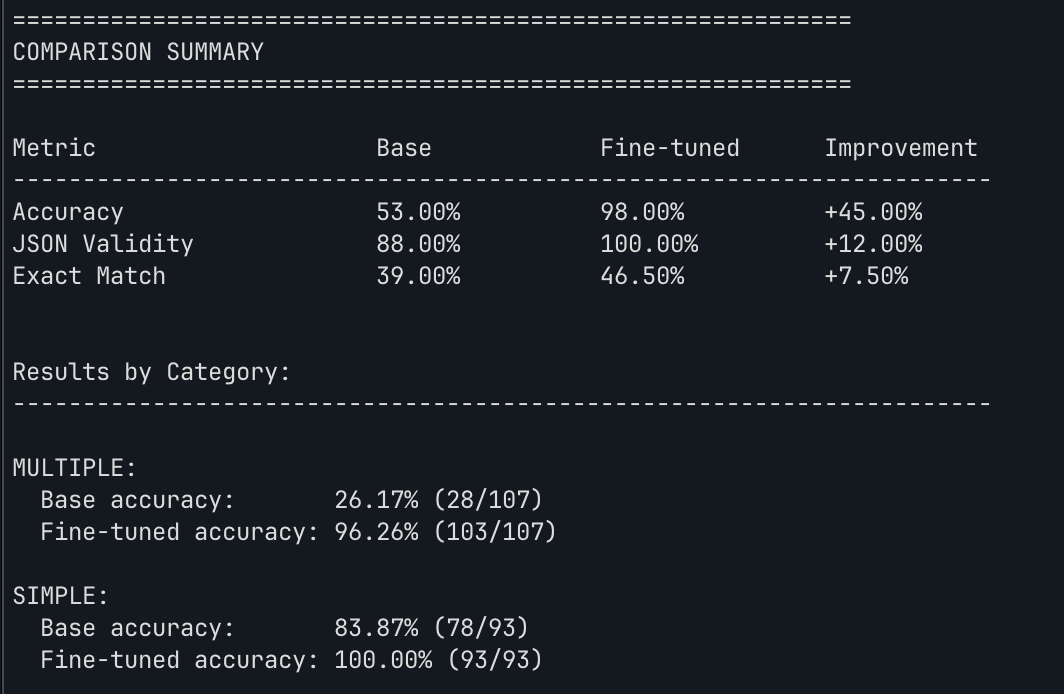
Multiple metrics: Compute accuracy (correct function calls), JSON validity rate (well-formed outputs), and exact match rate (perfect predictions).
Category metrics: Results are segmented by task type (single function call, multiple function calls, no function needed) to identify specific weaknesses.
Comparison baseline: Evaluate both the base model and fine-tuned model to quantify improvement.
@dataclass
class EvalMetrics:
    total_samples: int = 0
    correct_calls: int = 0
    partial_correct: int = 0
    valid_json: int = 0
    exact_match: int = 0

    @property
    def accuracy(self) -> float:
        return self.correct_calls / self.total_samples

    @property
    def json_validity_rate(self) -> float:
        return self.valid_json / self.total_samples


def evaluate_model(model, tokenizer, test_data, config):
    """Evaluate a model on held-out test data."""
    metrics_by_category = defaultdict(EvalMetrics)
    overall_metrics = EvalMetrics()

    for test_case in tqdm(test_data, desc="Evaluating"):
        # Generate prediction
        prompt = format_prompt(test_case["query"], test_case["tools"])
        response = run_inference(model, tokenizer, prompt, config)
        predicted_calls = extract_function_calls(response)

        # Score prediction
        result = evaluate_single(predicted_calls, test_case)

        # Update metrics
        overall_metrics.total_samples += 1
        if result["correct"]:
            overall_metrics.correct_calls += 1
        if result["valid_json"]:
            overall_metrics.valid_json += 1
        # ... update category-specific metrics

    return overall_metrics, metrics_by_category
The output gives you a clear comparison:
Once your model has been validated, it needs to go somewhere. That’s where the registry and serving layer come in.
Model Registry and Deployment
We will use HuggingFace Hub as the model registry and vLLM for high-performance serving. The push script supports two modes:
LoRA adapters only: Smaller upload (~100MB), but needs the base model at inference time.
Merged model: Full model weights (~15GB for 8B), ready for direct deployment with vLLM.
dstack apply -f .dstack/workflows/push.dstack.yml \
  -e CHECKPOINT="/mnt/cache/checkpoints/your-run/lora_adapters" \
  -e REPO_ID="username/my-model" \
  -e MERGE=true
The merge process:
- Loads the LoRA checkpoint
- Loads the base model
- Merges LoRA weights into base model weights
- Saves the combined model in standard format
- Uploads to HuggingFace Hub
vLLM provides production-grade inference with continuous batching, PagedAttention, and an OpenAI-compatible API:
# .dstack/workflows/serve.dstack.yml
type: service
name: llm-serve

image: vllm/vllm-openai:latest

port: 8000

env:
  - MODEL_ID
  - HF_TOKEN

volumes:
  - /home/<user>/.ai-lab-cache:/mnt/cache

commands:
  - |
    python -m vllm.entrypoints.openai.api_server \
      --model "$MODEL_ID" \
      --host 0.0.0.0 \
      --port 8000 \
      --dtype auto

resources:
  gpu: 24GB
At this point, you’ve manually run training, evaluation, and deployment. But we also have the option to make the entire pipeline runs itself.
CI/CD
Most continuous integration implements the full ML lifecycle. For example you can also trigger training manually or by commit message:
# .github/workflows/train.yml
name: Train

on:
  workflow_dispatch:
    inputs:
      model:
        description: 'Base model'
        default: 'unsloth/llama-3-8b-Instruct-bnb-4bit'
      dataset:
        description: 'Training dataset'
        default: 'Salesforce/xlam-function-calling-60k'
      formatter:
        description: 'Data formatter'
        default: 'xlam'
  push:
    branches: [main]

jobs:
  train:
    if: contains(github.event.head_commit.message, '[train]') || github.event_name == 'workflow_dispatch'
    runs-on: ubuntu-latest

    steps:
      - uses: actions/checkout@v4

      - name: Install dstack
        run: pip install dstack

      - name: Configure dstack
        run: |
          dstack config \
            --url ${{ secrets.DSTACK_SERVER_URL }} \
            --token ${{ secrets.DSTACK_TOKEN }}

      - name: Submit training job
        run: |
          dstack apply -f .dstack/workflows/train.dstack.yml \
            -e MODEL="${{ inputs.model || 'unsloth/llama-3-8b-Instruct-bnb-4bit' }}" \
            -e DATASET="${{ inputs.dataset || 'Salesforce/xlam-function-calling-60k' }}" \
            -e FORMATTER="${{ inputs.formatter || 'xlam' }}" \
            -e SPACE_ID="${{ secrets.TRACKIO_SPACE_ID }}" \
            --detach
Cost and Resource Optimization
Even with owned hardware, efficiency matters. GPU time is valuable, and wasted computation delays iteration.
The volume mount strategy ensures maximum cache reuse:
volumes:
  - /home/ubuntu/.ai-lab-cache:/mnt/cache
The cache stores:
- Model weights: Downloaded once, reused across runs
- Datasets: Preprocessed data persists between training jobs
- Checkpoints: Resume training from any saved state
QLoRA reduces trainable parameters by ~99%:
| Configuration | Trainable Params | Memory (8B model) |
|---|---|---|
| Full fine-tune | 8B | ~60GB |
| LoRA (r=16) | ~20M | ~16GB |
| QLoRA (r=16) | ~20M | ~10GB |
This is what makes 8B model training feasible on a single RTX 3090.
Batch Size Optimization
Effective batch size = per_device_batch_size × gradient_accumulation_steps
For a 24GB GPU with an 8B model:
per_device_train_batch_size: 2(limited by memory)gradient_accumulation_steps: 4(effective batch of 8)
On smaller GPUs, reduce the batch size or sequence length. With Unsloth’s 4-bit quantization, even 6GB cards can train 7B models—just expect more accumulation steps.
Larger effective batches improve training stability with minimal throughput impact.
Scaling from Home to Cloud
The stack supports multiple compute setups, depending on your needs:
On-premises hardware Consumer hardware handles fine-tuning and serving. Perfect for iteration, experimentation, and small models.
Cloud VMs When you need more VRAM or multiple GPUs, dstack provisions cloud instances on demand. Pay only for what you use.
Existing Kubernetes cluster dstack integrates with Kubernetes.
The training code, evaluation logic, and deployment patterns are identical. Only the compute target changes.
Conclusion
Having an home lab is great: fast experiments, rapid prototyping, quick feedback loops. When it’s time to scale, just move to cloud/cluster fleet. Check the github repo example .